Quick answer: the only fully safe URL characters are lowercase letters, numbers (a–z, 0–9), and hyphens (-). Spaces, capitals, and special symbols can quietly wreck crawlability, CTR, and rankings. Below: which characters help your SEO, which hurt, and how to fix bad URLs without losing rankings.
You’ve finally set up your site. All the planning, development, and design are over. Now, you want to show off and share the page’s link. In your CMS, it looks absolutely gorgeous: <code>yourdomain.com/café & co</code>. Then you paste it into your search bar or in your friend group’s Slack thread to see this monstrosity: <code>yourdomain.com/caf%C3%A9%20%26%20co</code>.
To Google, this is just a mess of characters that creates crawl confusion, duplicate content, and other problems you don’t need in your life. For people, this looks more like a scam or a broken website that hasn’t seen a visitor since Amazon was selling books. However you look at it, such URLs could potentially kill your CTR rates along with any ranking potential.
Having a clear URL shouldn’t require a computer science degree. In this guide, we aim to break down the essentials of safe characters in URLs, the characters to avoid, and other things to keep an eye out for.
The Short Answer: Which Characters Are Safe in URLs?
The golden rule for safe characters in URLs is simple: safe characters in URLs are lowercase alphanumeric characters (a-z, 0-9) and hyphens (-). Every other character, like spaces, underscores, special symbols, and capital letters, opens the possibility of technical risks that may compromise the user experience, hinder search engine rankings, or break link sharing.
Technically, RFC 3986 also allows other unreserved characters like ., _, and ~, but they are generally avoided for SEO and readability.
The Three Categories of URL Characters (Referring to RFC 3986)
If you want to understand how different characters and symbols affect your rankings or hurt your layout, you need to look at RFC 3986. This is the official Internet Standard (STD 66) that defines the structure and generic syntax for URIs, or Uniform Resource Identifiers. Think about URIs as “name tags” that identify online or offline resources (URLs are the concrete directions for finding something on the web).
RFC 3986 specifications dictate how URLs and URIs are examined by servers, browsers, and search engine crawlers.
The technical documentation for all of this is very detailed, but it essentially splits every character on your keyboard into three different categories:
- Unreserved Characters: These are safe to use. They include standard uppercase and lowercase letters (\(a-z\), \(A-Z\)), numbers (\(0-9\)), and four specific symbols: the hyphen (-), underscore (_), period (.), and tilde (~). Browsers and search engines read these naturally without requiring percent-encoding. These characters won’t trigger specific routing rules or command executions in the network architecture. However, to protect your rankings, you should refrain from using uppercase letters in the URL path, as search engines treat case-sensitive paths as different pages, which can trigger duplicate content issues or require safety measures (like 301 redirects).
- Reserved Characters: These characters, like ?, /, :, #, [, and ], are riskier, as they have predefined jobs within the URL for structural reasons. For starters, question marks usually separate the main URL path from query parameters, and hash symbols indicate page anchors. While you can use them, you need to use them within their intended structural roles. If you need to use them as regular text (like putting a question mark in a blog title inside the URL), they must be percent-encoded. Otherwise, it will only confuse crawlers and split your indexing.
- Unsafe Characters: These should never be used directly in their raw form. They include spaces, control characters, quotation marks, and non-ASCII characters (such as emojis or language-specific letters like é, ć, and č). The issue is that Internet protocols require URLs to be transmitted using a restricted set of safe ASCII characters. Therefore, browsers must automatically percent-encode them (turning a space into %20, or é into %C3%A9) before sending them. While this ensures the URL works, it results in long, unreadable, and messy URL strings that are difficult for users to copy, share, and remember.
Here is how these categories translate directly to your search performance:
| Character Type | RFC 3986 Category | SEO Verdict | Technical Reason & Practical Impact |
|---|---|---|---|
| Alphanumeric (a-z, 0-9) & Hyphens (-) | Unreserved | Green Light | Fully optimized. Ensures maximum readability, clean SERP appearance, and high Click-Through Rates (CTR). |
| Uppercase Letters (A-Z) | Unreserved | Yellow Light | Technically valid, but high SEO risk. Web servers treat URL paths as case-sensitive. If not strictly managed, they trigger severe duplicate content issues, waste crawl budget, and split backlink equity across multiple URL variants. |
| Underscores (_), Periods (.), Tildes (~) | Unreserved | Yellow Light | Technically safe, but suboptimal. They transmit without encoding, but Google does not treat underscores as word separators (e.g., seo_tips may be read as a single word, whereas seo-tips is read as two distinct keywords). |
| Structural Symbols (?, /, :, #, [, ], &*) | Reserved | Yellow Light | Functional use only. These have predefined architectural jobs (routing paths, passing query parameters, or marking page anchors). Never include them as raw text in static blogs or category slugs. |
| Spaces, Quotes, & Control Characters | Unsafe | Red Light | Never use directly. Network protocols cannot transmit them raw. Browsers force aggressive percent-encoding (e.g., spaces become %20), resulting in broken, unreliable, and messy URL strings. |
| Non-ASCII Characters (Diacritics: é, ć, č, Emojis) | Non-ASCII | Red Light | Avoid in paths. In the URL path, they trigger aggressive percent-encoding (e.g., é becomes %C3%A9), wrecking the SERP appearance. If used in the domain name, they don’t use percent-encoding but instead trigger Punycode translation (e.g., xn--…), which confuses users. |
How Special Characters Can Hurt Your SEO
URL best practices will always stick to clean and semantic strings, which act as roadmaps both for human users and search engine crawler bots. Most technical problems arise when you inject non-standard characters into that clean roadmap.
Here’s a quick rundown of special characters in URL SEO that can hurt overall string hygiene and negatively affect search performance without you even realizing.
Percent-Encoding Can Wreck SERP Appearance and CTR
Remember the first example (caf%C3%A9%20%26%20co)? That happens when the browser finds a non-ASCII or unsafe character, and uses percent-encoding (or URL encoding) to make it safe for the internet server. This translates human-readable words into a string of hexadecimal triplets.
So, this is what you get:
yourwebsite.com/café-&-co vs. yourwebsite.com/caf%C3%A9%20%26%20co.
This looks like a possible scam link for the everyday user in the SERPs or on communication channels like Messenger or Slack, screaming spamminess. This can result in a drop in your organic CTR as users usually avoid clicking on links that appear broken.
Reserved Characters Can Run The Risk of Creating Crawler Confusion and Duplicate-Content
Problems may arise for reserved characters that have defined roles in the URL structure. If you use them purely for decorative or naming purposes in blog posts, you can confuse web crawlers.
These symbols are identification markers for search engine bots to identify page protocols and fragments. Using them outside these strict roles can cause Googlebots to cut off part of the URL string, drop off a page entirely, or fail to index the content you want to rank.
Capital Letters Can Split Indexing (/About vs /about)
As mentioned, even safe characters in the URL may face scrutiny. Web servers are sensitive to case formatting (think of Linux/Unix systems), and to these servers /About and /about are two completely separate files.
If you mix capital letters into your slug, or if an external site links to yours with an uppercase letter, search engines may crawl both versions. Without the precise tags in place, this splits up link equity in the middle, signaling duplicate content issues to Google and hindering your core page’s ranking potential.
Spaces Break Link Sharing and Copy-Paste
Blank spaces can cause the most damage if you leave them in a live URL string. Spaces are universally invalid in URLs, so browsers will instantly rewrite them into %20 hex code with percent-encoding.
In addition to the visual ugliness, the space breaks the link sharing physically. When you attempt to copy and paste a URL with spaces in the string, the hyperlink will cut off exactly where the space occurs. This leaves the next user with a broken link and leaves you without organic referral traffic and natural backlink generation.
Modern browsers can automatically convert the spaces into a whole string to keep the hyperlink from breaking during copy-paste, but the resulting URL becomes messy, long, unreadable, and potentially suspicious.
Ampersands and Question Marks May Turn Into Query Parameters
Ampersand in URL SEO, along with question marks, may get misinterpreted. In web development, question marks signal the URL query string’s beginning while ampersands separate individual key-value pairs within the same string. They are meant for dynamic tracking codes, search bars, or dynamic sorting filters.
As such, if you include either of them in a standard static blog URL slug (/services/seo-&-ppc), crawlers will interpret them as developer parameters instead of structural words. This can cause the bot to disregard everything after the symbol or recrawl the page continuously, assuming it’s a dynamic variation, wasting crawl budget.
Hyphens vs Underscores: What Google’s Guidance Actually Says
Should you use underscores or hyphens to separate words in a slug? The answer is clear, as it lies directly within Google’s hyphens vs. underscores URLs SEO guidance.
The official documentation explicitly states that you should use Hyphens (-) instead of underscores (_) in your URLs. Why?
Google’s crawling and indexing systems treat these two marks in different ways:
- Hyphens (-) are treated as word separators.
- Underscores (_) are treated as word joiners.
Now, Google has evolved to automatically separate words connected by underscores, but it’s still suboptimal to use them because it forces the bots to use extra processing power to decode the URL string. Additionally, older crawlers and other search engines may still not separate them correctly, which can hurt your overall visibility.
So, practically, algorithmic logic can still affect a real-world digital agency slug:
- If your URL path reads /seo-services/, search engines read that as two individual, targeted keywords: “seo” and “services”.
- If your URL path reads /seo_services/, search engines read that as one single, continuous block of text: “seo_services”.
Google Search Central explicitly states its preference to developers and site managers:
“We recommend that you use hyphens (-) instead of underscores (_) in your URLs. This helps search engines more easily identify the concepts in the URL path.”
The verdict should be to always use hyphens. Unless you are using legacy application constraints that you cannot change, there’s no other reason to use underscores in your URL slugs. Stick to hyphens to ensure every keyword you place in a URL works actively toward your search visibility.
URL Characters to Avoid (and What to Use Instead)
If you want to keep your URL strings clean and fully optimized for SEO, you actively need to monitor the characters that end up in your slugs. Just like you would monitor and maintain your website.
To help you with special characters in URL SEO, here’s a reference table that maps out the most prominent problematic characters, the issues they cause, and the SEO-friendly replacements you should use to replace them.
| Character | Why It’s a Problem | SEO Replacement |
|---|---|---|
| Spaces | These are invalid and could break copy-pasting, splitting links and destroying cleanliness. | Hyphen (-) |
| Ampersand (&) | These separate query parameters in development. Static use leads to crawlers missing content paths. | The word “and” or a Hyphen (-) |
| Question Mark (?) | Defines the start of the query parameter string. Using it halts standard crawling and signals either filtering or dynamic tracking. | Hyphen (-) or remove entirely |
| Hash / Pound (#) | Used for anchor links and on-page fragments. Anything you put after # will be ignored by indexing bots. | Hyphen (-) or remove entirely |
| Percent (%) | Triggers URL encoding. If it sits in a slug, the server looks for hexadecimal codes. | The word “percent” or a Hyphen (-) |
| Plus Sign (+) | Often interpreted as blank space shortcuts inside query parameters, bringing back the same issues as space. | Hyphen (-) |
| Equal Sign (=) | This is used for assignment logic within query parameters (?page=2). In a static slug, it can derail parameter mapping. | Hyphen (-) or remove entirely |
| Underscore (_) | May be treated as word joiners, not separators, gluing targeted keywords together. Even if treated as separators, underscores can complicate crawling. | Hyphen (-) |
| Capital Letters | These can cause duplicate content and split indexing problems in Unix/Linux servers. | Lowercase letters always |
| Non-ASCII (é, ć, č) | Triggers unreadable percent-encoding (%C3%A9), which looks highly spammy in SERPs and drastically lowers CTR. | Clean Latin equivalents (e, c, c) |
| Emojis | Unsafe for raw web transmission, as they transform into long, broken strings of alphanumeric code that wreck user trust. | Remove entirely |
How to Fix Bad URLs Without Losing Rankings
Identifying your faulty URLs is only the beginning of your job. The real challenge is cleaning them up without any dents in your traffic, keyword rankings, and visibility you’ve already worked hard for.
A lot of SEO guides highlight why special characters are bad, but they seem to skip the actual fixing mechanics. Here’s a technical workflow that can help you migrate messy URL paths to optimized structures.
Audit with Screaming Frog
Before changing anything, you need to audit the URL health of your entire site. For this, you can use Screaming Frog SEO Spider to crawl your site.
When the crawling’s over, go to the internal tab and look at the Address column. Use the filters to isolate URLs that contain capital letters, special characters, or any unwanted reserved signs (percent codes, underscores, etc.). Export this list to a CSV file.
Build an Old→New Slug Map in a Sheet
Import the CSV file directly into Excel or Google Sheets to map out structural changes. Create a two-column spreadsheet structured like this:
- Column A (Old URL): The exact, live URL currently indexed by Google (e.g., example.com/blog/seo_tips/).
- Column B (New URL): The fully optimized, lowercase, hyphen-separated path you want to deploy (e.g., example.com/blog/seo-tips/).
This sheet should be your master document, letting you track every page during the migration process.
Implement 301 Redirects
When your sheet is ready, you should communicate to search engines that your pages have moved permanently. This is where 301 redirects come in. If you change a URL without a redirect, users and crawlers will get the 404 “Page Not Found” error, killing your rankings.
- For WordPress Sites: Get a WordPress plugin like Redirection. Just import the spreadsheet doc directly into the plugin, and create site-wide redirects instantly and permanently.
- For Dev Teams (Server Level): In a custom infrastructure, your dev team can inject the rules directly into the server configuration files with either Apache or Nginx rewrite snippets to handle the redirects at the server root.
Update Internal Links at the Source and Don’t Lean on Redirects
Setting up the 301 redirects is only part of a job well done. True, they do send the users to the right place, but relying only on them forces search engine crawlers to go through extra server hops every time they’re on your site, wasting crawl budget and ruining loading speeds.
To avoid this, go back to your database or CMS to update navigate menus, footer links, and body content links so they point directly to the new, optimized URL path. Eliminate the internal redirect loops entirely.
Re-Submit Key URLs in Search Console
Now, open your Google Search Console dashboard and take your highest-traffic, newly optimized URLs and paste them individually to the URL Inspection Tool at the top of the page. Once the pages are checked, click the Request Indexing button. This will signal crawlers to prioritize crawling the new redirect path and update the live index immediately, minimizing rank fluctuations.
When NOT to Fix Bad URLs
Changing live URLs always carries a certain amount of risk as search engines re-evaluate the page.
If you have a messy, older URL with underscores or capital letters with a massive profile of high-authority external links, the best thing to do is to leave it alone. The aesthetic gain of changing such a slug is nothing compared to the damage of the risk of losing historical link equity during a migration. Focus on fixing new content, low-traffic pages, or critical errors that are actively causing indexing problems.
For Developers: Encoding When Special Characters Are Unavoidable
Special characters become unavoidable when software applications handle dynamic data inside the URL (like searches or filters). Here’s a way to handle them properly without hurting the technical SEO footprint.
Percent-Encoding in 60 Seconds
URLs can only handle US-ASCII characters. Anything outside this undergoes percent-encoding, replacing the reserved or unsafe characters with % followed by their hexadecimal value. For example, a space becomes %20, an ampersand becomes %26, and é becomes %C3%A9.
Path vs. Query-String Rules
- The URL Path (/category/slug/): Controls indexing. Rules are strict; symbols like ?, #, or & will break routing logic or split your index if unencoded.
- The Query String (?q=search): Highly dynamic. Structural indicators like / are safe here, but ampersands (&) and equal signs (=) must be strictly managed to protect your parameter logic.
encodeURI vs. encodeURIComponent
- encodeURI() encodes an entire URL, keeping functional routing characters like:, /, ?, and & intact.
- encodeURIComponent() encodes a single value or segment destined for a query parameter, escaping structural characters not to disrupt the parent URL.
The Quick Code Example
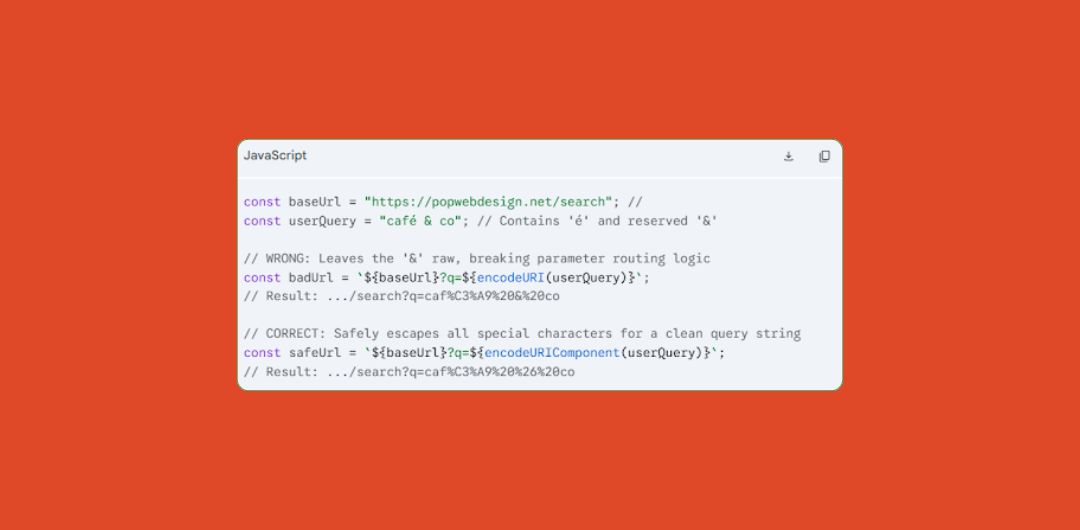
Using encodeURIComponent ensures data transfers perfectly without causing search engines to misread your content data as active tracking parameters.
Frequently Asked Questions
What are the unsafe characters in a URL?
Unsafe characters are quotation marks, spaces, symbols ( <, >, [, ], {, }), and non-ASCII characters like emojis or region-specific alphabet characters. Web servers can’t process them and thus convert them into messy, percent-encoded text strings.
What characters are safe in a URL?
The only safe characters are lowercase alphanumeric characters and hyphens (a-z, 0-9, and -). These are “unreserved” characters; web browsers and servers understand them natively without any translation.
Should URLs use hyphens or underscores?
Always use hyphens. While Google’s algorithm can read underscores when they are incorrectly word separators, other browsers and search engines may not, and treat these query strings as word joiners, gluing words together.
Do special characters affect SEO?
Yes. They can hurt organic CTR because they lead to ugly, spammy-looking URLs. Also, characters like ?, &, and # have functional programming roles, and misusing them in static paths causes duplicate content issues and crawl budget waste.
Can URLs have spaces?
No. Spaces create invalid URL paths. When they are left in a slug, most browsers overwrite them with %20. This breaks copy-pasting, ruining user sharing capacity, and cutting off referral traffic.
Are non-English characters bad for SEO?
While Google can crawl and index them, they can be problematic for user experience. Non-English characters trigger percent-encoding, which, again, looks like spam to users and lowers organic traffic performance.
Finishing Thoughts
When structuring URLs, your safest bet is to use lowercase letters, numbers, and hyphens to keep your pages fully visible and accessible. Messy URLs can kill your rankings, break your links, and erode user trust.
If you inherited a site with hundreds of messy URLs and don’t really know how to fix them, reach out to us. We prioritize corrections by traffic and link equity in our technical SEO audits to protect your rankings while cleaning up your architecture.