The one-size-fits-all digital interface is close to being dead. Presenting the same layout to business travelers looking for the quickest connections and the family vacationer looking for good deals on leisure packages will only hurt user retention and conversion rates.
Generative UI or GenUI can help bridge the discrepancies and dynamically assemble custom layouts in real time to address specific user behavior, context, and intent. In this article, we’ll talk about what generative UI design looks like in action and how AI-driven personalization in UI/UX design can change your user journeys for the better.
Key Takeaways
- What it is: Generative UI is a dynamic interface layer where AI compiles brand-safe, pre-approved design components at runtime based on real-time user intent, rather than serving a static layout.
- The Core Concept: AI doesn’t invent colors, pixels, or components from thin air. Instead, it serves pre-built assets designed by humans and adheres to strict brand design systems.
- Strategic Fit: GenUI can be an effective personalization tool for high-intent user flows where various user profiles perform actions. As such, for a single customer persona, standard layouts may be enough.
- Process Path: Organizations that want to scale from static layouts to AI-driven personalization must first test the waters with rule-based systems to map out an effective AI strategy.
Why Generative UI Is Taking Off in 2026
The popularity of generative UI is scaling fast because the technology opens a new, more personalized way to talk to users, using a variety of pre-made, branded design assets. Instead of designing new elements or layouts out of nowhere for different customer bases, these orchestration models assemble pre-approved branded layouts from component libraries to meet user objectives.
What made GenUI go from a theoretical concept to a usable technology? Experts point to three factors that made the architecture possible:
Component-Driven, Governed Systems
As of now, AI software cannot build interfaces reliably from scratch without breaking layouts or messing up brand guidelines. Still, Medium states that according to the State of the Designer 2026 report, 72% of product designers now actively leverage generative AI workflows to remain consistent, boost efficiency, and abandon mundane, repetitive tasks. In order for this to work, companies and design teams were forced to clean up their design architecture and create polished systems that could be used as predictable “Lego Sets.” In other words, every button, form field, and card has become pre-coded with set variables; an AI can change layouts at runtime without breaking the application.
The Rise of the UX Interface Layer for Autonomous Software Agents
Traditional, static interfaces simply can’t handle modern AI model orchestrations. When a Large Language Model determines a specific user goal, it also needs a modern interface that is capable of displaying those specific outcomes in real time. This is the interface counterpart to the rise of autonomous agents, which can plan and execute multi-step tasks rather than responding to a single user prompt. In other words, without the right generative UI design systems intact, an advanced autonomous agent would be trapped inside an old static layout, acting only as a basic chatbot.
Personalization Scaling from Assets to Layouts
In the “old days” of AI-driven personalization, the technology would often only swap out text blocks or change product recommendations within a fixed page layout to cater to the user. While this approach worked, UX personalization needs to evolve constantly to keep conversion returns high.
Product teams are thus shifting focus from simply personalizing the information on a page to dynamically re-architecting the interface structure itself based on exact situational parameters.
How AI-Driven Personalization Redefines the User Journey
Generative UI restructures the interface layouts based on user behavior, predictive intent, and contexttual signals, which dramatically changes digital experiences compared to static screens.
Instead of forcing everyone to use the same framework, the layout shifts at runtime to meet specific situational needs. GenUI reshapes the digital experience through three primary mechanisms:
Behavioral Adaptation
The technology monitors user interactions with the digital platform and reorders interface surfaces to put high-priority tasks and relevant product details in front of the user in a given situation.
- In eCommerce, everyone, from casual to regular shoppers, was looking at the same visuals, reviews, and styling options. While the consumer-focused variant works for, let’s say, a casual shopper looking for outdoor gear, it doesn’t match the intent of a procurement manager. When they log in to buy outdoor equipment, the platform instantly changes into a spreadsheet-style bulk-order table with quick-input SKU fields, live volume discounts, and shipping logistics data.
- In other industries, the priorities are different, but the logic is the same. In SaaS, a project management tool might prioritize a layout with code repository feeds, terminal windows, and active pull requests. But for a product owner, the same dashboard link may show Gantt charts, budget trackers, and milestone summaries.
Contextual & Accessibility Adjustments
It isn’t just the layout that changes. External variables, like environmental lighting, device status, user fatigue, and physical orientation, can also trigger shifts. For instance, if a user is using the app while walking or under bright direct sunlight, the layout automatically increases typographic contrast, simplifies the visual density, and expands target button sizes.
These fluid micro-adjustments build on core usability guidelines established by organizations like the Nielsen Norman Group, moving from manual accessibility toggles to an interface that is responsive by default.
Predictive & Anticipatory Flows
Apart from adopting user goals and external variables, GenUI also helps the user find what they want. The system tracks interface hesitation, erratic scrolling patterns, or form-field abandonment to surface proactive assistance exactly when a user experiences friction.
Static interfaces simply “stood by” while users gave up and left. These layouts adjust to remove barriers. If the user pauses or backtracks while filling out a complex multi-step checkout form, the interface can dynamically split the layout to surface a contextual help widget, highlight a single micro-step, or present a simplified payment confirmation block to keep the user moving smoothly through the funnel.
The Generative UI Maturity Model
The Generative UI maturity model offers a clear strategic roadmap for companies to move from static layouts to intent-driven interfaces. In order to introduce AI-driven personalization without chaos, you need to evaluate your current digital assets and where they sit across the spectrum below.
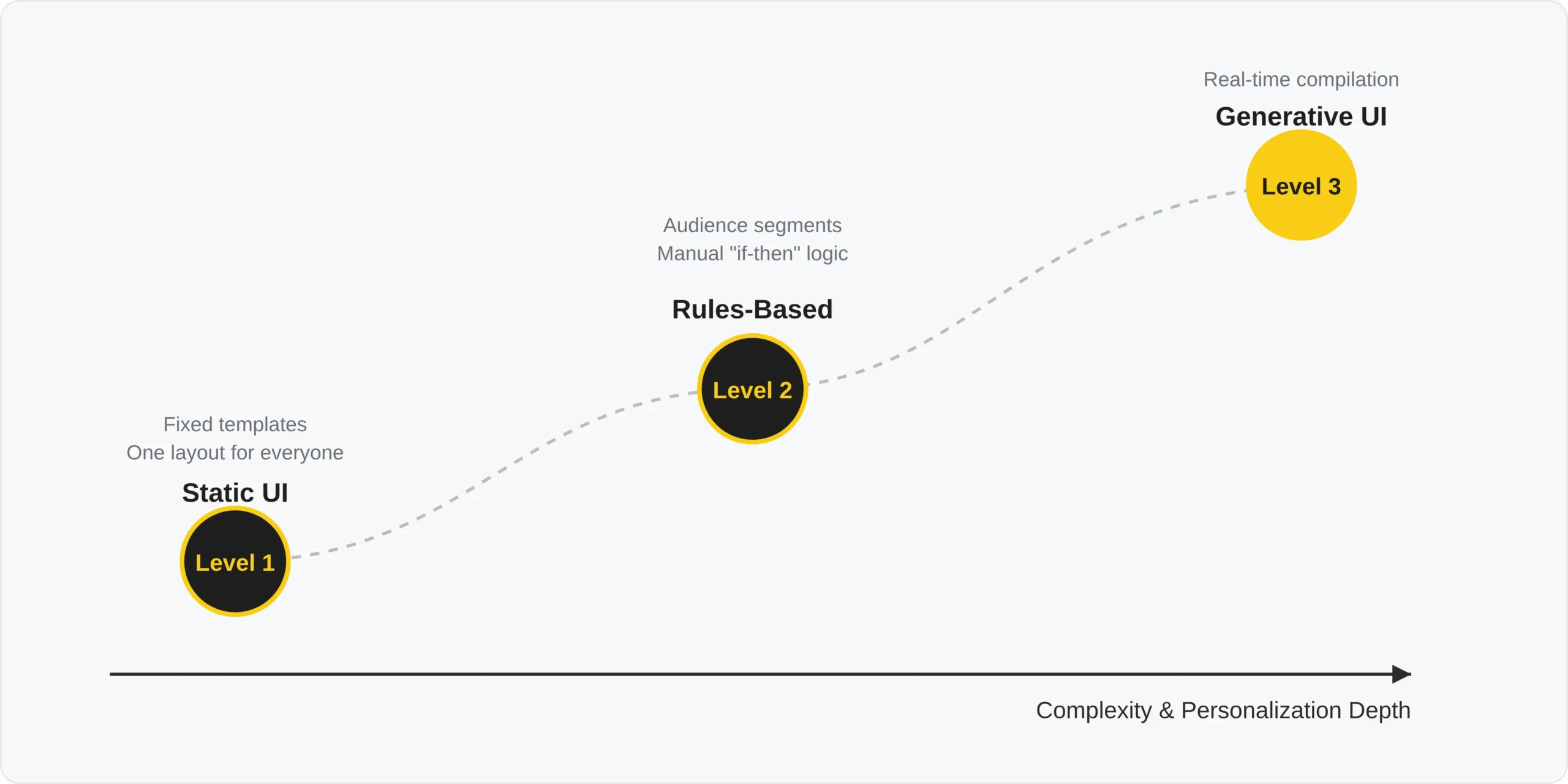
Understanding where your product falls on this model clarifies the necessary next steps for development:
- Level 1. Static UI: This is your baseline. The interface relies on fixed templates. The responsive design adapts to screen sizes, but the page architecture, navigation, and visual patterns are identical for every visitor. For most sites, this is the starting point.
- Level 2. Rule-Based Personalization: This is the middle ground in which hard-coded, human-configured parameters can handle some degree of variation. The marketing and engineering teams create explicit user segments (e.g., “Returning SaaS Buyer” vs. “First-Time Visitor”), and then the system runs manual if-then checks to swap out content recommendations, banners, or CTA strings within a rigid layout.
- Level 3. Generative UI: This is the “final destination.” The application dynamically selects and combines approved interface structures. Here, an AI orchestrates and analyzes situational user context and intent. It then pulls modular layouts directly from your pre-compiled, human-designed design system to assemble a tailored runtime viewport on the fly.
How to Build Generative UI (Without the Chaos)
Building a GenUI system means building an architecture where the AI system only uses the pre-built, human-designed components and does not generate visuals or write new code from scratch. This structure is what keeps the AI integration and the UI reliable, brand-compliant, and predictable.
Essentially, building a stable GenUI without technical debt builds on these foundational layers:
- The Component Library: These are the Lego Bricks. You need a rigidly coded and highly structured system, where every data display card, input form, button, and typography style exists as an independent code snippet. The AI can only use these and isn’t allowed to invent any new values, colors, or custom elements.
- The Personalization Data Layer: This is the context. Clean user metadata, active session behavior, intent indicators, and user history. This provides the backdrop for the system to determine why a user is on the screen.
- The AI Orchestrator: This is the fast runtime model that reads the data layer, handles the user request, and chooses the best component combination from the library. It passes an assembly instruction object to the client application to render on the fly.
The Tooling Required
Generative UI design requires you to combine a standard front-end infrastructure with intelligent layers beneath. What this means is that you need to use a more intricate tooling ecosystem and not just rely on a single proprietary system.
- Component System Infrastructure: Let’s say a tool like Figma can serve as the baseline for defining your variables (typography, spacing, colors) that human designers already created. These tokenized variables can be fed directly into component libraries built on modern mobile and web frameworks like Flutter, Vue, or React.
- Design-to-Code & Pipeline Adapters: These are the interpreters. The pipeline adapters translate static assets and design guidelines into machine-readable JSON schemas or structured definitions that large language models (LLMs) can easily read and interact with without breaking standard system rules.
- Runtime Rendering & Stream Frameworks: These tools stream the layout instructions from the backend server to the user’s mobile device or server. Most open-source stacks and dev kits from platforms like Vercel or Google allow developers to stream raw component parameters directly into live code, rendering the final interface at runtime.
Risks, Guardrails, and When NOT to Use Generative UI
Even though having ultra-personalized, adaptive layouts and content takes user experiences to new heights, deploying generative UI can introduce significant risks. Without the necessary human-designed operational guardrails, it can ruin brand consistency, regulatory compliance, and search visibility.
There are always pros and cons to consider when integrating AI into design, but in the case of GenUI, not having a strict design system and clear pre-defined structures, deploying runtime-assembled interfaces may not be safe for enterprises to use.
Brand Safety & Governance
As mentioned before, the layout model must never be allowed to generate frontend code from scratch, introduce unapproved hex colors, or alter corporate typography. Otherwise, you cannot maintain absolute control over your digital entity.
The AI builder must work exclusively with human-designed, pre-approved, and pre-compiled assets within the design system. The AI should work as an assembler, not as an open-ended designer. It’s better that the technology uses a fixed set of components, as this eliminates the risk of visual errors, broken layouts, or off-brand customer experiences.
Accessibility
A dynamically changed interface probably won’t be accessible automatically if built incorrectly. This can confuse assistive technologies. Screen readers and keyboard navigation paths rely on a predictable document structure.
When building a GenUI, adhering to W3C WCAG 2.2 guidelines is the default technical baseline. This means any dynamically injected component must immediately pass aria-live region announcements, maintain logical tab indices, and preserve adequate color contrast ratios so that personalized layouts remain usable for everyone.
SEO & Crawlability
Dynamic interfaces that are assembled at runtime using client-side AI processing can bring on massive indexing challenges for search engine bots. Crawlers prefer clean, semantic server-rendered HTML, and if your primary landing page structure requires a live user interaction or real-time AI processing to render its core textual content, search bots may index a blank page or a generic template skeleton.
To protect your organic traffic and ranking, your core marketing pages and informational funnels should rely on server-side or static, pre-rendered architectures and leave the dynamic interface generation for deep conversion steps or user dashboards.
When a Fixed Interface Is the Right Call
Generative UI design is a truly revolutionary approach to design, but can be inefficient or even counterproductive for low-variance paths and/or high-trust transactions.
Think about it like this: you probably would feel uneasy if standard processes (like credit card checkout lines, password resets, account creation, and regulatory legal disclosures) changed dynamically. People generally prefer familiar visual flow, stability, and familiarity in these scenarios.
Altering layout positions, input placements, or step counts in these high-security environments will only trigger user anxiety, raise error rates, and may directly drop conversions. Keep these transactional zones entirely static.
How to Measure Generative UI’s Impact
If you want to measure just how well your generative UI system is performing compared to your static layout, you need to track specific behavioral metrics like funnel drop-off rates across user segments, task completion speed, and system error rates. Vanity metrics like AI adaptation rate mean little because a personalized interface layer is only valuable if it really helps users finish their goals faster with less friction.
To get a better understanding of the ROI of implementing GenUI, the product team should monitor the following performance metrics:
- Task Completion Rate & Velocity: Again, the sole purpose of the tech is to help users achieve their goals. Track whether they truly accomplish their goals faster with the adaptive layout.
- Segmented Funnel Drop-Off: Track how the different user groups get through the conversion paths. If the adaptive eCommerce product card or the SaaS dashboard works correctly, you should see drop-off rates decrease within high-variance customer segments who typically struggle with generic layouts.
- Automated Accessibility Pass Rates: Run automated, continuous accessibility testing on runtime-assembled screens. The dynamically generated DOM must consistently meet accessibility requirements for screen readers, keyboard navigation, and other assistive technologies. Compliance shouldn’t be sacrificed for the sake of personalization.
- Guardrail & Fallback Error Rates: Log the AI orchestrator’s output. It’s important that you know how often the agent proposes invalid layout configurations, faces latency spikes, or forces the application to fall back to the static template. If your fallback rates are high, your orchestration prompt or data layer needs refinement.
Generative UI FAQs
What is generative UI (GenUI)?
Generative UI is an approach to building adaptive interface layouts using AI in real-time from pre-approved component libraries, based on user intent. Instead of serving everyone the same static web templates, it reads situational behavior and context to create unique screen structures tailored to the needs of the user.
Is generative UI the same as generative AI?
No. Generative AI is the broader underlying technology, while genUI is the specific usage of AI at runtime to orchestrate layout changes. Generative AI includes text, image, and prototyping tools; generative UI only refers to the AI model that orchestrates or assembles production-ready interface components at runtime for the end user.
How is generative UI different from adaptive or responsive design?
Responsive design adapts to viewport size. Adaptive design refers to predefined layouts for different devices or contexts, not necessarily changing content.
Rule-based personalization is what changes content according to predefined logic.
Generative UI restructures the interface dynamically using AI. GenUI can extend beyond traditional rule-based personalization by using AI models to interpret context and build the layout on the fly.
Will generative UI replace UX designers?
No. GenUI changed the role of UX designers from building static pages to creating component-based design systems and defining system interaction rules. The AI requires human-designed assets and predictable design variables to function safely, meaning that human designers remain completely irreplaceable.
What are the risks of generative UI?
The risks of generative UI include layout instability, brand inconsistency, and unexpected interface hallucinations if the orchestration layer is poorly restricted. Also, if the AI is allowed to write free-form frontend code rather than selecting from fixed, pre-approved components, it can easily break user trust and degrade user experience.
Does generative UI affect SEO or accessibility?
Yes, the technology can harm SEO indexing if the core content also relies on real-time client-side processing, and it can disrupt accessibility if components do not strictly adhere to WCAG standards. To remedy this, marketing surfaces should remain server-rendered and static. Adaptive layouts should also preserve logical keyboard tab indexes and ARIA live regions.
Evolve with GenUI
Generative UI isn’t a magic pill that replaces designers, but a logical step forward that combines strict design systems, real-time personalization data, and artificial intelligence to deliver adaptive user experiences. The technology heavily relies on an already existing, structured design system, enabling it to transition from rigid templates toward on-brand interfaces that meet the user’s situational needs.
Whether you are still using Level 1 static templates or already experimenting with rule-based systems, the path to GenUI must be mapped out carefully. Working with a seasoned UI/UX team ensures that moving up the maturity level keeps your a pplication accessible, SEO-friendly, and brand-safe on all touchpoints.